Summary
Changing Planned Maintenance System (PMS) software is usually decided for good reasons: better shore-ship synchronisation, fleet-wide reporting, integration with purchasing. The risk lies in the data. A migration that moves the records but loses the history, mixes up counters or breaks the link between jobs and spares leaves the ship with a modern system that tells the wrong story.
This paper describes a migration approach that treats the data as the product and proves it is correct before anyone on board depends on it.
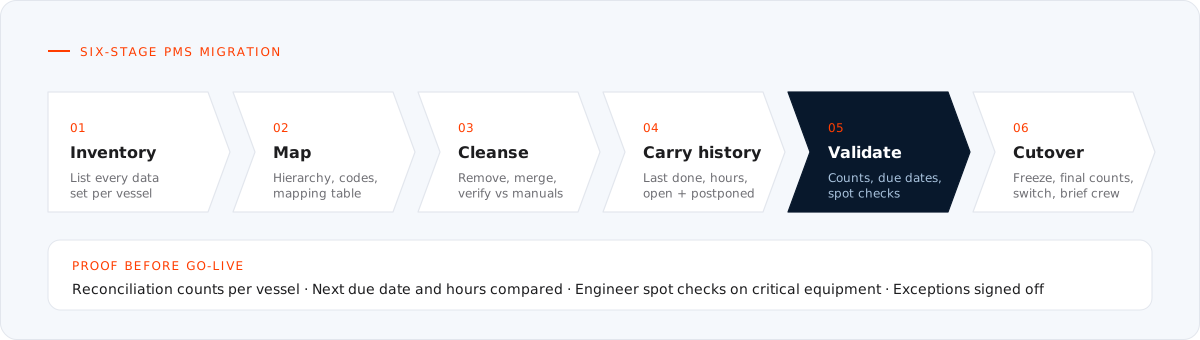
Figure 1. A migration is finished when it has been proved, not when the import has run.
1. Why migrations go wrong
The same failure patterns appear again and again:
- Moving the mess. Duplicate components, outdated jobs and unused spares are carried straight into the new system, where they are harder to remove.
- Lost history. Only open jobs are migrated, so the new system cannot show when a job was last done, and due dates are recalculated from the go-live date.
- Broken counters. Running-hour values arrive without the readings behind them, so running-hour jobs fall due at random.
- Code collisions. Two systems use different hierarchies or numbering, and the mapping between them is done by hand, item by item, without a reference.
- No proof. Nobody can show, record by record, that what arrived matches what was sent.
Each of these is avoidable with planning.
2. Take inventory of what you have
Before mapping anything, list what the current system holds for each vessel:
| Data set | Typical contents |
|---|---|
| Equipment register | Hierarchy, maker, model, serial numbers, locations, critical flags |
| Job library | Job descriptions, intervals, responsibilities, class and critical markers |
| Maintenance history | Completed jobs with dates, running hours, remarks and reports |
| Counters | Current running hours and the history of readings |
| Open work | Jobs due, overdue and postponed, with approvals |
| Spare parts | Part catalogue linked to equipment and jobs, with maker part numbers |
| Stock | Quantities on board, locations, minimum levels |
| Attachments | Manuals, drawings, photos and forms linked to records |
This inventory becomes the scope of the migration and the checklist for validating it.
3. Map structures and codes
Every PMS organises equipment differently. One uses a ship coding standard such as SFI down to component level; another uses its own numbering; a third mixes both. The mapping has to be explicit:
- Agree the target hierarchy first, ideally one standard for the whole fleet.
- Build a mapping table from every source component to its target position, so each decision is recorded and can be reviewed.
- Map job types, intervals and responsibilities to the target system's code lists, and check field lengths and mandatory fields against its import templates.
- Keep the source identifiers on each migrated record, so any item can be traced back to where it came from.
4. Clean before you move
Migration is the best opportunity a fleet will get to correct its maintenance data, because every record passes through review anyway. Typical cleansing includes:
- removing equipment that has been taken off the ship, and adding equipment fitted since the original build;
- merging duplicate components and jobs;
- checking intervals and job wording against the makers' manuals rather than carrying old errors forward;
- linking spare parts to the right equipment and correcting part numbers against the makers' parts lists.
Cleansing decisions should be recorded with the mapping, so the office can see what changed and why.
5. Carry the history that matters
Not every historical record needs to become a live record in the new system, but the information that drives the schedule must survive:
- Last done date and running hours for every recurring job. Without these, the new system recalculates every due date from go-live and the schedule is wrong on day one.
- Counter readings. The current value and enough history to show the trend.
- Open and postponed work, with approvals and new limits.
- Class and critical-equipment status, so survey planning continues without a gap.
Older history can be migrated as read-only records or archived with a clear reference, according to the owner's record-keeping requirements. The point is that it remains retrievable.
6. Spares and stock at cutover
Stock is the one data set that keeps changing during the migration, because the ship keeps consuming and receiving parts. The practical approach is to migrate the catalogue and the links early, then take a stock count at cutover and load opening balances from that count rather than from an old extract.
7. Validate before go-live
A migration is finished when it has been proved, not when the import has run. Validation should combine:
- Reconciliation counts: components, jobs, history records, counters and stock lines in the source against the target, per vessel.
- Due-date comparison: for a sample of jobs, the next due date and hours in the new system against the old one. Differences point straight to missing history or counter errors.
- Spot checks by an engineer: a sample of critical equipment followed end to end, from register to job to spares to history.
- Exception list: every record that failed to import or was changed in cleansing, reviewed and signed off.
8. Cutover on board
The final step happens on the ship:
- agree a short freeze window in which no PMS entries are made in the old system;
- take final counter readings and the stock count;
- load the delta, run the validation checks again and switch over;
- give the crew a short, practical briefing on where things are in the new system, built around the jobs they will actually do in the next weeks.
Keep the old system available read-only for a period after go-live, so any question about history can be answered quickly.
Conclusion
A PMS migration succeeds when the new system shows the same truth as the old one, only cleaner: every job with its history, every machine with its hours, every part linked to the work that uses it. Planning the inventory, mapping, cleansing and validation up front is what makes that possible.
References and further reading
- International Maritime Organization, International Safety Management (ISM) Code, section 10 (maintenance records) and section 11 (documentation).
- SFI Group System, the functional ship coding structure: see our article The SFI Group System.
- Companion papers: From instruction book to job library and Running hours, calendar intervals and class.
Planning a PMS migration? We prepare, map, clean and validate PMS data for migration between systems and deliver it in the target system's import format. See our Planned Maintenance System services.