Summary
Most Planned Maintenance System (PMS) problems on board are not software problems. They are data problems. A system that lists the wrong jobs, at the wrong intervals, with instructions nobody can follow, will be ignored by the crew and will fail the first serious audit, whichever product it runs on.
This paper sets out the method we use to build a PMS job library from the equipment makers' own instruction books, so that every job, interval and spare part can be traced back to its source.
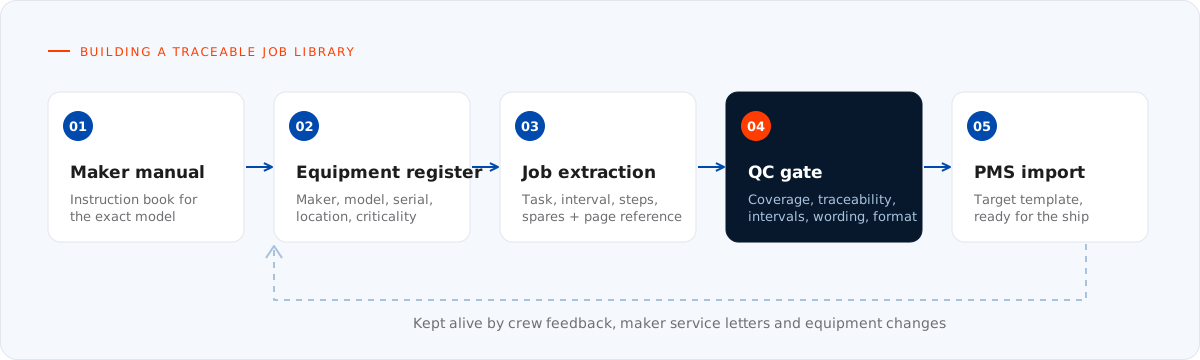
Figure 1. From instruction book to import: every job keeps its source reference, and the library is kept alive by feedback.
1. Why the data decides
A PMS has three users, and each needs something different from the same records:
- The engineer on board needs a job that says exactly what to do, with what tools, parts and safety precautions, and how to know it was done properly.
- The technical superintendent needs a reliable picture of what is due, overdue and postponed across the fleet.
- The auditor or surveyor needs evidence that maintenance follows a documented system and that the system matches the equipment actually fitted.
When the job library is copied from a sister ship, a generic template or memory, all three lose. Jobs appear for equipment that is not on board. Intervals do not match the maker's recommendation. Part numbers point to a different model. Crews learn that the PMS cannot be trusted, and they start keeping their own lists.
2. Start with the equipment register
Every job hangs off a piece of equipment, so the register comes first. For each item we record:
- a clear position in the vessel's hierarchy (system, then equipment, then component), normally organised to a ship coding standard such as SFI;
- maker, model, type and serial number, read from the nameplate or the delivery documentation;
- location on board, so the job can be found and planned;
- whether the item is critical equipment in the sense of the ISM Code (see section 6).
Two units that look identical often are not. A different serial range, a later build or a field modification can change the maintenance requirements. The register should describe the equipment fitted, not the equipment in the original specification.
3. Source every job from the maker's manual
Our rule is simple: every job, interval, step and part number must be traceable to that equipment's own instruction book. Nothing is inferred, borrowed from another maker or reconstructed from experience.
In practice this means:
- Locate the maintenance chapter or schedule in the instruction book for the exact model.
- Extract each task the maker specifies, with its interval and the conditions attached to it.
- Record the source, meaning document, chapter and page, against the job, so anyone can check it later.
- Where the manual is silent, flag the gap for the owner's technical department to decide. Do not fill it in silently.
Traceability is what makes the library defensible. When a surveyor asks why a purifier is overhauled at a given interval, the answer is a page reference, not an opinion.
4. Write jobs crews can execute
A job title such as "Overhaul pump" is not an instruction. A usable job description contains:
- Scope: what the job covers and what it does not.
- Safety: isolation, lock-out, permits and personal protective equipment the maker or the company procedures require.
- Steps: the maker's sequence, in plain language, in the order the work is done.
- Tools and spares: special tools and the parts normally replaced.
- Acceptance: clearances, torque values or test results that prove the job was done correctly, taken from the manual.
Keep each job to one piece of work at one interval. A job that mixes a monthly check with a yearly overhaul cannot be scheduled or reported honestly.
5. Set the interval the maker intended
Makers specify maintenance by running hours, by calendar time, or by both. The library should keep that distinction:
- Running-hour jobs belong to equipment with a running-hour counter, such as main and auxiliary engines, compressors and purifiers.
- Calendar jobs suit equipment that ages whether it runs or not, such as safety equipment, stand-by machinery and structural items.
- "Whichever comes first" applies where the maker gives both, so a lightly used machine is still serviced on time.
Running-hour jobs are only as good as the counters behind them. Each counter should be tied to one machine, and the routine for updating it on board should be defined from day one. A companion paper, Running hours, calendar intervals and class, covers this in detail.
6. Flag critical equipment
Section 10 of the ISM Code requires the company to identify equipment and technical systems whose sudden operational failure may result in hazardous situations, and to provide specific measures to promote their reliability. This includes the regular testing of stand-by arrangements and of systems that are not in continuous use.
The PMS is where those measures become visible. Critical items should be marked in the register, their jobs should carry the right priority, and postponing them should need an explicit approval rather than a silent date change.
7. Link spare parts to jobs
A job that needs a part the ship does not carry will not be done on time. For each job we link the parts the maker expects to be replaced, using the part numbers and drawing references from the manual's parts list. This gives the purchasing team a demand forecast and lets the ship see, before the job falls due, whether the spares are on board.
Minimum stock levels for critical spares should follow the same logic: they come from the job library, not from guesswork.
8. Quality-check before import
Before anything is imported into the live system, the library goes through a structured check:
| Check | What we look for |
|---|---|
| Coverage | Every maintainable item in the register has its maker's jobs, and no job points to equipment that is not fitted. |
| Traceability | Every job carries a document and page reference. |
| Intervals | Units and values match the manual; "whichever comes first" is set where the maker gives two limits. |
| Wording | Steps are complete, in sequence and free of copy-paste from other equipment. |
| Spares | Part numbers match the parts list for the exact model. |
| Critical items | Flagged in the register and prioritised in the schedule. |
| Format | Field lengths, codes and mandatory fields match the target PMS import template. |
A library that passes these checks imports cleanly and needs very little rework once it is live.
9. Keep the library alive
A job library is never finished. It needs maintaining like the machinery it describes:
- Crew feedback: a simple route for engineers to report a job that is wrong, unclear or impossible to do as written.
- Manual revisions and service letters: when a maker changes a recommendation, the affected jobs are updated and the change is recorded.
- Equipment changes: replacements and retrofits, often done at dry-dock, must reach the register before the ship sails.
Conclusion
A trustworthy PMS starts with an equipment register that matches the ship and a job library that matches the makers' manuals, one traceable job at a time. That discipline is what turns a maintenance database into something crews actually use and auditors accept.
References and further reading
- International Maritime Organization, International Safety Management (ISM) Code, section 10: Maintenance of the ship and equipment.
- SFI Group System, the functional ship coding structure: see our article The SFI Group System.
- Companion papers: Running hours, calendar intervals and class and Migrating PMS data between systems.
Need a PMS job library built or reviewed? Our marine engineers build and QC PMS databases from the makers' own documentation, ready for import into your system. See our Planned Maintenance System services.